


How integration, analytics, and AI-generated insights help New Zealand businesses turn data into decisions
The Data Visibility Gap: Why Integration Matters
Walk into any successful business in New Zealand, and you'll hear a familiar frustration: "We have plenty of data—we just can't access it when we need it, in the format we need it."
Your NetSuite system holds detailed transactional data. Your analytics warehouse contains historical trends. Your external AI tools offer powerful analysis capabilities. But these systems operate in isolation, forcing manual extraction, transformation, and consolidation before any meaningful analysis can begin.
The NetSuite 2026.1 release introduces capabilities that fundamentally change this equation—connecting business systems, enabling AI to access unified data, and automatically generating insights precisely when and where your team needs them.
NetSuite Integration Platform (iPaaS): Connecting Your Business Systems
The Integration Challenge
Consider the typical system landscape at a growing New Zealand business:
- NetSuite ERP: Managing inventory, purchasing, financials, and order fulfilment
- CRM platform: Tracking sales pipeline and customer relationships
- eCommerce: Processing online orders
- WMS or 3PL system: Managing warehouse operations
- Business intelligence tools: Analysing trends and performance
Each system performs a critical function. But the gaps between systems create friction—manual data entry, reconciliation spreadsheets, delayed information, and inevitable errors.
How NetSuite Integration Platform Changes the Game
The new NetSuite Integration Platform provides an integration-platform-as-a-service (iPaaS) solution specifically designed to connect NetSuite with your other business systems.
Key Capabilities:
Low-Code Integration Tools: Build integrations without extensive programming expertise using visual, drag-and-drop interfaces.
Prebuilt Adapters: Dozens of prebuilt connectors for common business applications mean faster implementation and lower costs.
Process Automation: Define business rules that automatically trigger actions across systems—from inventory alerts to customer notifications.
Centralised Monitoring: Single dashboard visibility into all integration flows.
Real-Time Data Synchronisation: Keep data consistent across all systems without manual exports, imports, or reconciliation.
Practical Applications
Multi-Channel Sales Integration:
- eCommerce platform connects to NetSuite via prebuilt adapter
- Real-time inventory synchronisation ensures online availability reflects actual stock
- Orders from all channels consolidate in NetSuite for unified fulfilment
- Shipping tracking updates flow automatically to all systems
Quote to Invoice Automation:
- CRM quote automatically creates NetSuite sales order when accepted
- Sales order details flow to relevant operational systems
- Actual costs update NetSuite for accurate job costing
- Final invoice generates with actual costs, no manual entry
Why iPaaS Matters
If you're currently operating with point-to-point integrations or manual data transfers between systems, iPaaS represents a significant advancement:
- Centralised integration platform with unified approach
- Maintained, updated adapters reduce technical debt
- Single monitoring dashboard across all integrations
- Business-user-friendly tools for workflow modification
- Scalable architecture that grows with your business
Connecting External AI with NetSuite Analytics Warehouse
The most powerful AI insights require access to comprehensive, unified business data. The 2026.1 release introduces the NetSuite Analytics Warehouse AI Connector Service, which securely connects external AI platforms with your NetSuite data.
Understanding Model Context Protocol (MCP)
Model Context Protocol is an open standard that allows external AI systems (like Claude, ChatGPT, GitHub Copilot) to access internal business data securely whilst respecting permissions and security controls.
How It Works:
Rather than exporting data to AI platforms or copying information manually, MCP creates a secure bridge:
- You authenticate the AI platform with NetSuite Analytics Warehouse
- The platform requests specific data based on your natural language query
- NetSuite security validates permissions and retrieves relevant data
- AI analyses the data and provides contextual insights
Practical Example—Business Performance Analysis:
Traditional approach:
Your question: "How have our gross margins changed over the past 18 months across different product categories?"
Your process:
- Export sales data from NetSuite to Excel (30 minutes)
- Export product data with category classifications (15 minutes)
- Build pivot tables to calculate margins by category (45 minutes)
- Create trend charts manually (30 minutes)
- Interpret results and draft insights (30 minutes)
- Total time: 2.5 hours
AI-enhanced approach:
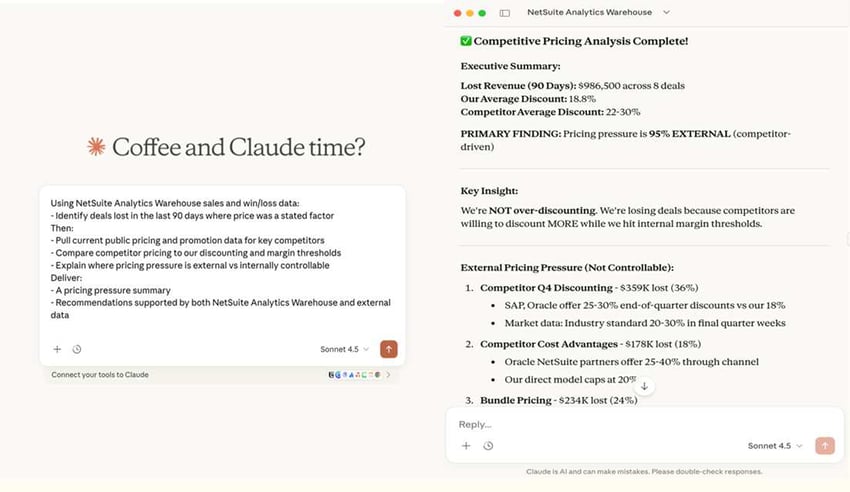
Your question to Claude Desktop (connected via MCP): "How have our gross margins changed over the past 18 months across different product categories?"
Claude's response (delivered in 60 seconds):
"Analysing your sales data from July 2024 to January 2026:
Gross Margin by Category:
- Category A: 34.2% average (stable trend)
- Category B: 28.7% average (declining 2.1pp over period)
- Category C: 41.5% average (improving 1.8pp over period)
Key Drivers:
- Category B margin compression driven by 8.3% cost increases outpacing 5.1% price increases
- Category C improvement due to product mix shift towards higher-margin items
Recommendation:
Review Category B pricing strategy. Margin compression suggests need for 3-4% price adjustment to restore target margins whilst remaining competitive."
Why This Matters:
The AI doesn't just calculate numbers—it identifies trends, contextualises changes, highlights category-specific patterns, and suggests actions. This type of analysis previously required senior analyst time. Now it's available on-demand to team members who need the insights.
Additional Use Cases
Operational Efficiency Analysis:Query: "Which location has the lowest productivity, and what's driving the underperformance?"AI identifies specific locations, analyses causes, and suggests improvement opportunities.
Inventory Optimisation:Query: "Which slow-moving inventory should I discount to free up cash?"AI analyses aging, velocity, margin profiles, and working capital impact with specific recommendations.
Multi-Location Analysis:Query: "Are our stock transfers between locations efficient?"AI examines transfer patterns, calculates costs, and recommends deployment strategy changes.
Security and Access Control
The AI Connector respects NetSuite's role-based security. Users can only access data they're already authorised to view within NetSuite. The AI platform doesn't store your data—it requests specific information for each query, analyses it, and returns insights.
AI-Generated Inventory Narratives: Insights Where You Need Them
Beyond connecting external AI platforms, NetSuite 2026.1 introduces built-in AI-generated insights directly within the interface—specifically targeting inventory management challenges.
How AI Inventory Narratives Work
The system automatically generates contextual summaries, key highlights, and recommended actions based on the specific page or report you're viewing.
Location Page Narrative—Practical Example
You navigate to a warehouse location page in NetSuite. Instead of reviewing raw inventory data across multiple tabs, you immediately see an AI-generated summary:
Warehouse—Inventory Summary
Your on-hand inventory at this location has decreased 5% over the past 30 days. Based on your average costing method, total valuation has decreased 7%.
Items at Risk of Shortage:
- Three items below reorder points with insufficient lead time coverage
Recommended Actions:
- Review purchasing requirements for flagged items
- Consider safety stock increases based on demand variance
- Check for transfer availability from other locations
What makes this valuable:
- Automatic insight generation with no manual report running
- Contextual relevance specific to the location you're viewing
- Actionable recommendations, not just data
- Embedded in workflow precisely when you're reviewing that location
- Instantly highlights items requiring attention among thousands of SKUs
Additional Inventory Narrative Applications
Open Purchase Order Report Narrative:
- Orders at risk of delay based on supplier performance history
- Items on order where demand has changed significantly
- Suppliers requiring follow-up
Current Inventory Snapshot Narrative:
- SKUs with unusually high or low stock levels versus historical patterns
- Items showing unexpected velocity changes
- Categories with overstock or shortage risks
Inventory Back Order Report Narrative:
- Customers most affected by current back orders
- SKUs creating highest revenue impact from stock-outs
- Root causes and alternative fulfilment options
Inventory Valuation Summary Report Narrative:
- High-value inventory concentration risks
- SKUs with significant valuation changes
- Categories requiring physical count verification
Why This Matters
Managing thousands of SKUs across multiple locations creates information overload. These AI narratives help operations managers focus attention on items requiring immediate action, rather than manually reviewing entire inventory catalogues.
Time savings example:
- Previous process: 2 hours daily reviewing inventory reports manually
- AI narrative process: 20 minutes daily reviewing AI-identified priorities
- Capacity freed: 1 hour 40 minutes for proactive planning
AI-Powered Customer Management
Beyond financial and inventory insights, the 2026.1 release introduces AI capabilities for customer relationship management.
AI Case Summaries: Faster Customer Support
Your customer service team receives an escalated case. The assigned CSR needs to understand what's happened, communication sentiment, similar previous issues, and resolution attempts.
Traditionally, the CSR spends 20-30 minutes reading through email threads, support notes, and communication history before contacting the customer.
AI Assistant for NetSuite CRM:
The system automatically generates a comprehensive case summary directly on the case page:
Case Summary
Sentiment Analysis: Escalating frustration (Negative)
Issue Summary:
Customer reports recurring service issues over past 30 days. Initial complaints handled via standard response. Situation escalated when customer threatened contract cancellation.Communication History: Timeline of interactions with sentiment progression
Previous Similar Issues: No similar complaints in past 12 months prior to recent period
Root Cause Indicators: Pattern analysis suggests specific operational issue
Recommended Actions: Immediate contact steps, short-term fixes, long-term prevention
The CSR has comprehensive context in 30 seconds instead of 30 minutes, enabling immediate, informed customer engagement.
NetSuite Customer 360: AI-Generated Comprehensive Overviews
Customer 360 provides a unified view of all customer interactions, transactions, and activities. The 2026.1 enhancement adds AI-generated narrative summaries with a single click:
Customer Overview
Relationship Summary: Years as customer, annual revenue, growth trends, margin profile
Recent Transaction Pattern: Changes in order frequency, value, and product mix
Product Evolution: Category shift analysis with opportunities
Support Interaction Analysis: Case volume, resolution speed, sentiment trends
Payment Behaviour: Payment cycle consistency, credit standing
Account Development Opportunities: Specific expansion possibilities based on behaviour analysis
Recommended Discussion Topics: Personalised talking points for next customer meeting
Account managers arrive at meetings with comprehensive customer intelligence, specific development opportunities, and competitive positioning insights—all generated automatically.
Data Quality Foundations
AI-generated insights are only as good as the underlying data. The 2026.1 release includes data management enhancements:
Expanded Data Flow Capacity
Previous: 2 million rows per data source
New: 5 million rows per data source
Larger businesses with high transaction volumes can now import complete data sets without splitting files.
Automated Subject Area Population
Data flows now automatically populate predefined subject areas, eliminating manual configuration steps.
Simplified Multi-Value Field Imports
New menu-driven process for multi-value fields eliminates complex workarounds and SQL coding.
Self-Service Analytics Resources
New Report Templates
Commonly used reports now available as templates that auto-populate with current data:
- Budget vs. Actuals
- Sales by Item, Customer, and Representative
- Income Statement
- Deferred Revenue Waterfall
Enhanced CRM Subject Areas
New prejoined data sets for CRM integration enable unified reporting across platforms.
Data Hierarchies
Organise complex data into hierarchical levels for consistent reporting without manual configuration.
Redesigned User Interface
More intuitive experience with clear navigation for administrators and business users.
Next Steps
Want to explore how these capabilities could transform your business intelligence?
Project Salsa specialises in NetSuite implementations for New Zealand businesses. Our team combines NetSuite platform expertise with industry knowledge to help you leverage integration, analytics, and AI capabilities effectively.
Contact Project Salsa to discuss:
- Integration strategy for your specific business system landscape
- Analytics Warehouse implementation and AI connector deployment
- Use case development for AI-generated insights
- Migration approach if you're currently using a legacy system
Learn more about all the updates in NetSuite 2026.1
This is just a summary of a few of the game-changing features in NetSuite 2026 Release 1. Read more about this release in the release notes. Most importantly, don't forget to request your Release Preview test account so you can get hands-on access and see how new features will work with your data, workflows, and customisations.
The preceding is intended to outline the Oracle NetSuite general product direction. It is intended for information purposes only and may not be incorporated into any contract. It is not a commitment to deliver any material, code, or functionality, and should not be relied upon in making purchasing decisions. The development, release, timing, and pricing of any features or functionality described for Oracle’s products may change and remains at the sole discretion of Oracle Corporation.