

.png?width=300&name=NetSuite%202026-68%20(2).png)
Ask most manufacturers a simple question, “what's on the floor right now, and what will it cost by the time it's built?”, and the honest answer usually takes a phone call, a spreadsheet, and a bit of guesswork to piece together.
That's not because the people running production aren't good at their jobs. It's because the systems underneath them were never built to answer that question cleanly. A work order gets scribbled on a whiteboard. Components get pulled from a shelf with no record of it. A finished unit shows up in stock, and nobody's entirely sure which batch of raw materials actually went into it.
This post walks through how NetSuite approaches that problem, from a single item definition through to a real, finished, costed build. Not a sales pitch for features that don't exist, just a straightforward look at how the pieces actually fit together.
The Problem With Whiteboards and Paperwork
Three things tend to go wrong without a proper system in place:
-
Production doesn't know what to build, or when. Without a clear work order, especially for a configurable product, the plan lives in someone's head rather than somewhere the whole team can see it.
-
Inventory gets committed informally, or not at all. Nobody has a reliable view of what's actually available, because stock gets allocated by memory rather than by record.
-
Paperwork can't be verified. A build sheet with no way to scan or check it against the plan means errors creep in between what was supposed to happen and what actually did.
None of this is a people problem. It's a systems gap.
The Assembly Item Record: More Than It Looks
In NetSuite, anything that's manufactured and consumes other components is called an Assembly Item. It's worth being precise about what this actually is: it's the definition of the thing, its bill of materials, its routing, its classification, not a physical unit sitting on a shelf.
One detail worth knowing: a bill of materials can be multi-level. A component inside one assembly can itself be a full assembly item, with its own bill of materials and its own work order. Change something three levels down, and that change flows up through every finished product that uses it, automatically. Nobody has to manually update every level by hand every time something shifts.
The same item record also holds the other half of the story: real, physical inventory. Stock on hand, total value, and bin locations across multiple sites, all sitting on the same record as the definition itself.
Work Orders: Work Orders: What to Build and What It Takes
A Work Order is how NetSuite tells production exactly what to build, when, and which components to use. It's technically optional, you don't have to create one for every build, but the moment a plan needs to be communicated to the floor, or a product has configurable options, this is where that plan lives.
Creating a work order does something useful straight away: it shows exactly what's being used against the plan. As components are consumed, available stock drops accordingly, so nothing else can be allocated against material that's already spoken for.
The Traveler: Work Instructions That Travel with the Build
NetSuite can print a Traveler directly from a work order. Think of it as the work instruction for the floor, the document that travels with the build. Every component carries its own barcode, ready to be scanned as it's picked. The document then breaks into one page per operation, each with its own work centre, start and end dates, and space for process notes and instructions.
For teams who'd rather skip paper altogether, there's a paperless route too. NetSuite's Manufacturing Mobile lets operators scan barcodes on a handheld device to report material issuance, completions, and labour directly, with work instructions available on the same screen.
Either way, the instructions travel with the build, whether that's a printed traveler scanned on the floor or a digital version on a handheld.
Tracking What Actually Happened
Two transactions do the real work of tracking a build as it happens:
-
The Work Order Issue signals that raw materials have genuinely been gathered and moved onto the floor. Once issued, those components come off the available stock count, so anyone checking inventory can see they're tied up in this build, not sitting idle somewhere else.
-
The Work Order Completion records what quantity has actually been finished and moved into inventory, tracked against what the original work order planned. This is also where backflushing happens, automatically consuming components at the point of completion rather than requiring a separate manual issue step first.
Together, these two transactions mean progress on a build doesn't depend on someone's memory of what happened on the floor that day.
What a Build Should Cost
NetSuite's Costed Bill of Materials report takes the bill of materials and routing and puts a dollar figure against every component and operation, all the way down through every level. The result is the expected cost of building the item, calculated from current costs.
It's worth being clear about what that number is. It's a forward-looking figure, what a build should cost, not a record of what a specific work order ended up costing. If the bill of materials, routing, or a component's cost changes, the figure recalculates.
The useful part is the breakdown. Instead of one total, you can see exactly where the expected cost comes from: which components carry material cost, and which sub-assemblies carry labour and machine time on top. That gives you a baseline to quote from, and a clear reference point when someone asks why a build is costed the way it is.
Visibility, Tailored to the Role
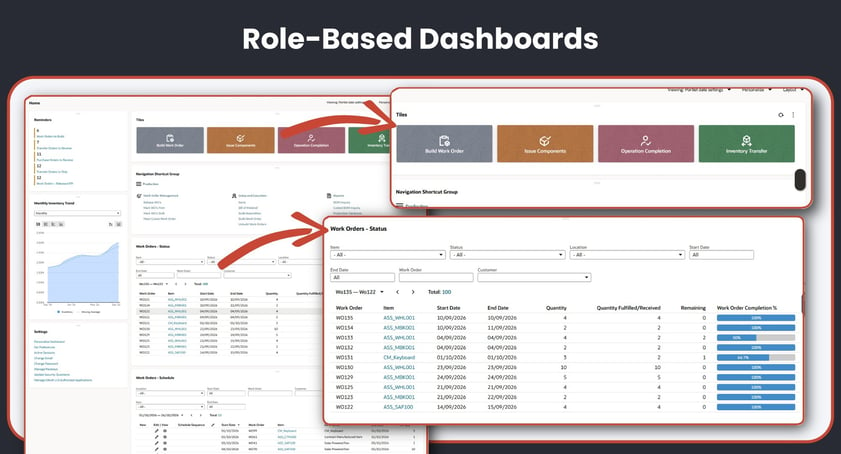
None of the above is much use if it's locked away in individual records nobody has time to open. NetSuite's dashboards are role-based, meaning the view someone sees is built around their job, not a generic, one-size-fits-all screen.
A production operator, for example, doesn't need to open record after record to check progress. A single view can show every work order's completion percentage at a glance, alongside anything already running behind schedule. Information tailored to your role, in other words, rather than a system everyone has to work around.
What This Actually Gets You
Put the pieces together, and the practical outcomes are straightforward:
-
Faster onboarding. New assemblies can be up and running in days, not months.
-
Fewer floor errors. Automatic backflushing removes manual counting mistakes.
-
Real inventory visibility. You know what's committed to production the moment it's ordered.
-
Changes that flow through automatically. Update a sub-assembly once, and it rolls up correctly everywhere it's used, no manual rework required.
See It in Action
This post covers the mechanics. If you'd rather see it working, start to finish, on a real build, we've put together an on-demand webinar walking through exactly this, from a single assembly item through to a fully costed finished product inside NetSuite.
If any of this raises questions about your own manufacturing setup, we're happy to have a no-obligation chat about what it could look like for your business. You can contact us here.
FAQs
What's the difference between an assembly item and a work order?
An assembly item is the definition of what's being built, its bill of materials, routing, and classification. A work order is the instruction to actually build a specific quantity of it, right now, for a specific plan.
What's the difference between a Work Order Issue and a Work Order Completion?
The Work Order Issue records that raw materials have been gathered and moved onto the floor, removing them from available stock. The Work Order Completion records what quantity has actually been finished and moved into inventory, tracked against the original plan.
What is backflushing?
Backflushing is when components are automatically consumed at the point a build is completed, rather than requiring a separate manual issue step beforehand.
Can I go paperless with NetSuite manufacturing?
Yes. Alongside the printed Traveler, NetSuite's Manufacturing Mobile lets operators scan barcodes on a handheld device to report material issuance, completions, and labour directly, with work instructions available on the same screen.
Can NetSuite show me what a build should cost?
Yes. The Costed Bill of Materials report adds a dollar figure to every component and operation, down to each level, giving the expected cost of building an item. It's a live calculation based on current costs, so it shows what a build should cost rather than what one specific work order ended up costing.
Is a multi-level bill of materials difficult to manage?
No. If a component is itself a full assembly item, NetSuite tracks the relationship automatically. A change to a sub-assembly flows up into every finished product that uses it, without manual rework.
Do all users see the same dashboard?
No. NetSuite's dashboards are role-based, so the information in front of someone is tailored to their job, a production operator sees something different from a finance controller, for example.