


Oracle NetSuite has been steadily building AI capability directly into the platform, rather than bolting it on as a separate add-on. For New Zealand wholesale distributors, manufacturers, and professional services firms already running NetSuite, that matters. It means the AI sits inside the workflows your team already uses, rather than requiring a new system to learn.
Here is a rundown of five features worth knowing about, what they do, and where they fit.
1. Text Enhancer
Text Enhancer is NetSuite's built-in AI writing assistant, designed to speed up the copy your team writes inside the system every day, from customer-facing quote descriptions to internal transaction memos.
Two things make it practical rather than gimmicky:
-
Field-level control. You choose exactly which fields Text Enhancer is active on. That means it can be switched on for, say, item descriptions or sales order memos, without cluttering fields where free-text AI generation isn't useful.
-
Prompt parameters. Rather than relying on generic AI output, you can set prompts with defined parameters, so the tool consistently generates copy in your house style, tone, and format. Once configured, this removes a lot of the back-and-forth of getting AI-generated text to sound like your business rather than a chatbot.
For distribution and manufacturing businesses producing large volumes of item descriptions or order notes, this can save meaningful admin time without sacrificing consistency.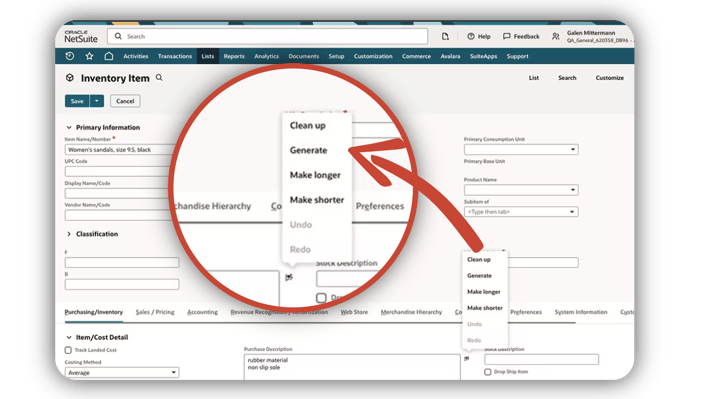
2. Exception Management
Exception Management applies AI to your transactional data to flag things that look out of the ordinary. It's a similar concept to the fraud detection logic used by tools like Traild, though built directly into NetSuite's transactional layer rather than as a standalone reconciliation product.
It works in two directions:
-
Outlier detection. It identifies unusual transactions, such as a payment that's significantly larger than typical, or one that doesn't match historical patterns for that supplier or customer.
-
Missing transaction detection. Just as usefully, it can pick up the absence of an expected transaction. If you pay a supplier every month like clockwork and one month that payment doesn't happen, Exception Management will flag it.
A sensitivity toggle lets you adjust how aggressively the tool flags activity, so finance teams can tune it to their own risk appetite rather than being flooded with false positives (or missing genuine issues because the threshold is too loose).
One important caveat: this tool needs roughly 18 months of transactional history before it can reliably establish what “normal” looks like for your business. It's not a day-one feature for newer NetSuite accounts.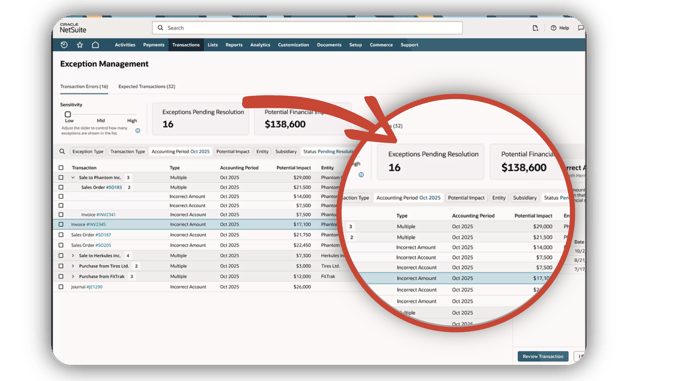
3. Intelligent Close Manager
Month end is where a lot of finance team hours disappear, and Intelligent Close Manager is aimed squarely at that pain point. It's a portlet that gives a centralised, AI-assisted view of the period-end close process.
From that single view, finance teams can:
-
Track progress of month-end tasks in real time
-
Have exceptions flagged automatically as they come up during the close
-
Assign and manage month-end tasks across team members
For businesses running multi-entity or multi-subsidiary closes, having this consolidated in one place rather than spread across spreadsheets and email threads is a genuine efficiency gain.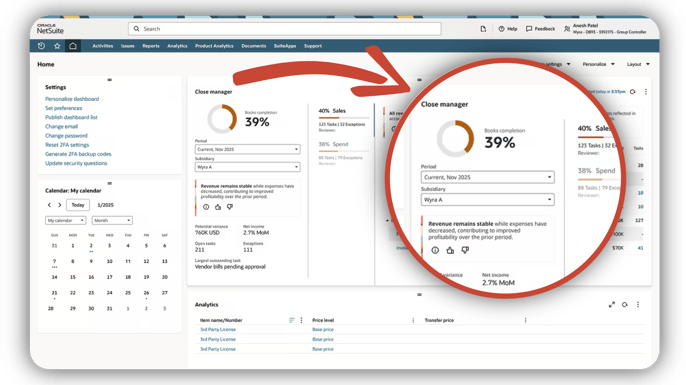
4. Narrative Insights
Narrative Insights brings AI-generated commentary to NetSuite data, and the key point of difference is scope: it isn't limited to standard reports. It can be applied across other parts of NetSuite too, surfacing plain-language insight wherever there's meaningful data to interpret.
It's particularly useful for identifying:
-
Trends developing over time
-
Anomalies worth a closer look
-
Gaps in the data itself
-
Opportunities that might otherwise go unnoticed
.png?width=676&height=380&name=Untitled%20-%20August%2021%2c%202026%20at%2015.07.16%20(1).png)
5. MCP (Model Context Protocol)
MCP allows external AI tools and assistants to connect directly into NetSuite, opening the door to more flexible AI-driven workflows on top of your existing data. Setting it up involves a fairly straightforward configuration process within NetSuite.
For businesses that have MCP connected, or are considering it, there's a SuiteApp worth flagging: AI Connector Service Companion. It's built for users who find writing effective AI prompts a challenge, and comes with around 100 out-of-the-box prompts designed specifically for NetSuite use cases. If you've got MCP running but aren't sure how to get the most from it, this is a practical way to close that gap.
Getting the Most From What You Already Have
None of these features requires ripping up your existing NetSuite setup. They layer AI capability onto processes you're already running, whether that's writing copy, catching unusual transactions, closing the books, interpreting data, or connecting external AI tools. The starting point is simply understanding which of these fit your business's current pain points, and switching them on where they'll add the most value.
If you'd like to talk through which of these features would make the biggest difference for your business, get in touch with the Project Salsa team.
Looking Ahead: NetSuite Next
The five features covered above are just the current chapter. Oracle has also announced NetSuite Next, the next level of AI-embedded ERP, including a conversational assistant called Ask Oracle, with a New Zealand rollout expected later this year. Read our full breakdown of NetSuite Next and what it means for your business.
FAQ’s
Q: What AI capabilities does NetSuite have?
A: NetSuite has built AI directly into the platform rather than offering it as a separate product. Current capabilities include an AI writing assistant (Text Enhancer), anomaly and exception detection for transactions (Exception Management), an AI-assisted period-end close view (Intelligent Close Manager), AI-generated commentary on data across the system (Narrative Insights), and a protocol for connecting external AI tools directly to NetSuite (MCP). Oracle has also announced NetSuite Next, a broader AI-embedded platform shift including a conversational assistant called Ask Oracle. This is currently only available in the US and Canada, with a New Zealand rollout expected towards the end of this year.
Q: Does NetSuite have built-in AI, or do you need a third-party add-on?
A: NetSuite's core AI features, such as Text Enhancer, Exception Management, Intelligent Close Manager, and Narrative Insights, are built into the platform itself. Third-party AI tools can also connect in via MCP, but the native features don't require a separate purchase or system integration.
Q: Is NetSuite's AI any good for finance and accounting teams?
A: Yes, several of NetSuite's AI features are specifically aimed at finance teams. Exception Management flags unusual or missing transactions, and Intelligent Close Manager gives a centralised view of month-end close progress with automatic exception flagging. Both are designed to reduce the manual review work finance teams typically do.
Q: Do we need to buy separate software to use these AI features?
A: No. These features are built into NetSuite itself, so there's no separate licence or system to integrate. Availability can depend on your NetSuite edition and module set, so it's worth checking which of these you already have access to. One exception is MCP: while the connection itself is built into NetSuite, using it does require your own separate subscription to an external AI tool, such as Claude, to connect through it.
Q: Which feature should we switch on first?
A: It depends on where your biggest pain point is. If your team spends a lot of time writing item descriptions or order notes, start with Text Enhancer. If month end is the bottleneck, Intelligent Close Manager is the more obvious starting point.
--
Statements regarding Oracle's future product plans, including NetSuite Next and Ask Oracle, are based on information available at the time of writing and are subject to change without notice. Timing of any New Zealand rollout has not been formally confirmed by Oracle and should not be relied upon for planning purposes. Please contact your NetSuite partner for the latest availability information.